
One desktop client for every S3-compatible storage
In short: S3 Explorer is a desktop S3 browser for Windows, macOS and Linux that connects to Amazon S3 and S3-compatible storage (Cloudflare R2, Backblaze B2, MinIO, Garage and more) from one interface, with 25 provider presets and a local index for buckets with millions of objects.
The problem
Object storage is no longer on a single provider:
- MinIO is no longer maintained. The
minio/miniorepository was archived in April 2026, and teams are moving to Garage, RustFS or SeaweedFS. - Egress costs push data elsewhere. Public assets go to Cloudflare R2, backups to Backblaze B2 or Wasabi, while application data stays on AWS.
- Legacy buckets remain. Migrations are rarely complete.
All of these speak the S3 API, but each has its own web console, its own quirks (path-style vs virtual-hosted addressing, regions, batch delete support, checksums), and sometimes no UI at all. Self-hosted admin consoles also add exposed surface, often used with root keys. The CLI is fine for scripts, not for browsing a bucket with millions of objects.
Connect to any provider
S3 Explorer is a desktop S3 browser for Windows, macOS and Linux (x64 and ARM64). 25 presets fill in the endpoint format, regions and addressing mode: AWS S3, Google Cloud Storage, Cloudflare R2, Backblaze B2, Wasabi, DigitalOcean Spaces, OVHcloud, Scaleway, Hetzner, MinIO, Ceph RGW, Garage, SeaweedFS, Dell ECS and more. Any other service works through a custom endpoint.
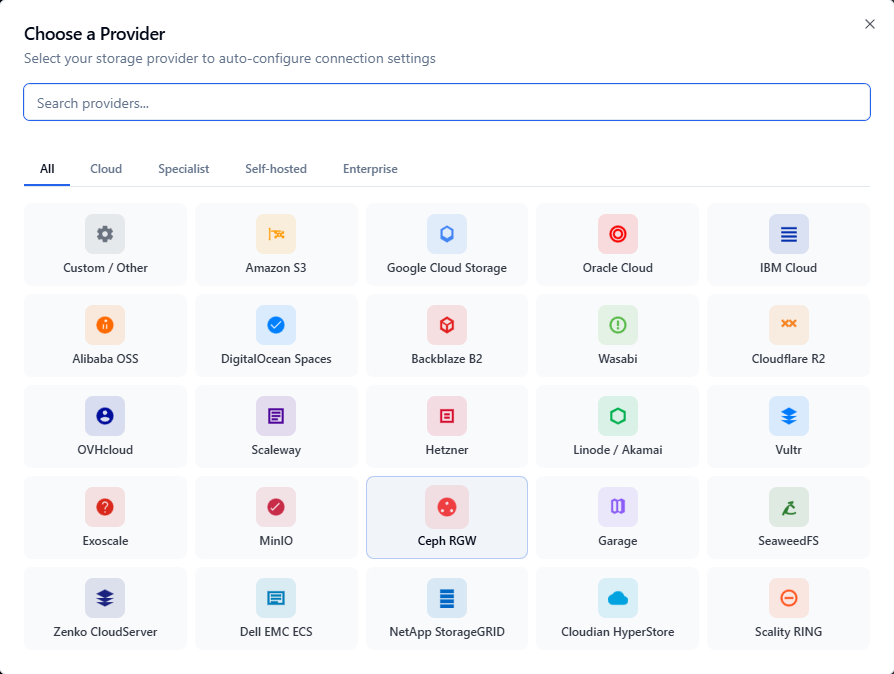
Provider presets, grouped by cloud, specialist, self-hosted and enterprise.
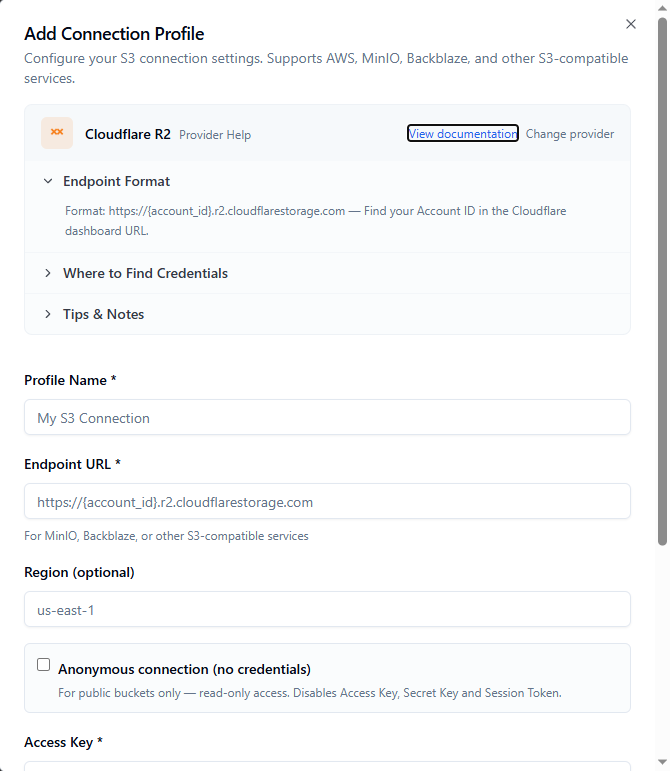
The R2 preset fills in the endpoint and documents where to find the credentials.
The provider guides list the settings and common mistakes for each one.
Handle large buckets
A local SQLite index makes navigation and search instant on buckets with millions of objects, without re-listing. Folder sizes and bucket statistics come from the same index.
Adapt to S3-compatible servers
Instead of a hard-coded list of provider behaviours, the client tries the most compatible request form, reads the server's response and adapts for the session. Bulk deletes, listings and uploads work on servers that differ from AWS.
Keep credentials local
Credentials are encrypted on the machine and sent only to the configured endpoint. Corporate setups are covered: proxy support (including PAC import), DNS-over-HTTPS fallback and temporary credentials (STS / AssumeRole).
Daily operations
- Multipart and parallel transfers, drag and drop
- Preview for images, video and audio; built-in text and image editor
- Object versions, tags, metadata, presigned URLs
- Cleanup of incomplete multipart uploads
- Per-request metrics with cost estimates
Built with Rust and Tauri rather than Electron: fast startup, low memory use, native binaries. Updates are delivered in the app and signed (Ed25519).
Limits
- Desktop only, not a shared web portal.
- Free and fully functional up to 5 connection profiles; a licence removes the limit.
- Anonymous telemetry is on by default (no bucket names, keys or credentials) and can be turned off in Settings → Privacy.
S3 Explorer was built to manage buckets spread across several S3-compatible providers from one secure, local interface.